
Workflows and Reproducibility in Practice
Last updated on 2026-07-04 | Edit this page
Overview
Questions
- How do pancakes help me with my research?
Objectives
- Create some take-away actions that are directly relevant to your research.
Workflows and Reproducibility in Practice: small changes you can make today
In the previous session, we saw that:
- big data changes how research is done
- workflows help manage complexity
- reproducibility makes results trustworthy
In this session, we will focus on a different question:
What small changes can you make to your own research this week?
Diagnosing your current workflow
Most workflows fail in predictable ways. Common weak points include:
- Data selection is undocumented
- Preprocessing steps are unclear
- Parameters are not recorded
- Results depend on manual steps
- Outputs cannot be regenerated
Where will this break?
(Individually or in small groups) Think about your current or recent project. Answer:
- What step would be hardest to repeat?
- What step do only you fully understand?
- What would fail if you revisited this in 6 months?
Record your answers in your log book as this will be useful for you to refer to when you are back in the office.
Manual work to workflow
Very few (probably zero) research projects start by building a workflow. In reality, projects evolve from a mostly manual proof of concept to a semi-automated MVP, and only eventually become a fully automated (and documented) workflow. In fact most projects don’t even make it that far! Despite all our motivational talk about workflows and reproducibility, there is no rule that says you have to build an automated workflow. It just happens that when your project complexity reaches a certain point, you will find yourself better off if you have one.
The typical progression of a workflow is as follows:
- Manual exploration
- Copy commands into a file
- Turn into a script
- Link scripts together
- Add structure (workflow)
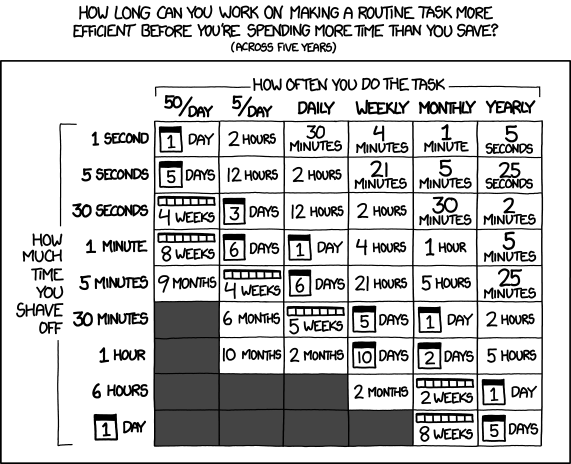
The pragmatic approach here is to only add structure when it will benefit your project, and when the cost/benefit of implementation is in your favour. Another pragmatic approach is:
Use simple tools that work, until they don’t
A workflow only matters when you need to rerun or trust your results.
What to document
You do not need to document everything.
Focus on the parts that would stop you from rerunning your work:
- Data sources and versions
- Key preprocessing steps
- Important parameters
- Decisions and assumptions
Document decisions (the “why”), not just actions (the “what”).
A fairly natural place to look for documentation in a project is a
README(.md) file.
The five‑minute README
Imagine someone opens your project folder in a year (it might even be you). Write down the headings of a README that would help them.
You do not need to write the content now. Just the headings are enough.
Use Wooclap to record your headings, and vote for others.
One concrete improvement
Think about your current or next project. Identify one thing you could improve:
- Add a README
- Record a data source
- Fix a random seed
- Document a filtering step
- Script a manual process
Write it down and commit to doing that one thing. Share your goals with a colleague so you are more likely to work on them (it works!).
Final Note
You do not need:
- perfect workflows
- complex tools
- full automation
You do need:
- clarity
- consistency
- small, repeatable improvements
Your final challenge
(With a partner or group of 3)
- Sketch your current workflow
- Describe your workflow to your partner
- Have your partner identify and unclear or fragile component
- Work with your partner to address the issue
- Repeat 2-4 with reversed roles
One last request
We strive to deliver relevant and engaging workshops. Please help us to do so by giving your feedback.
- Don’t let the perfect be the enemy of done.
- Your future self is your most important collaborator.